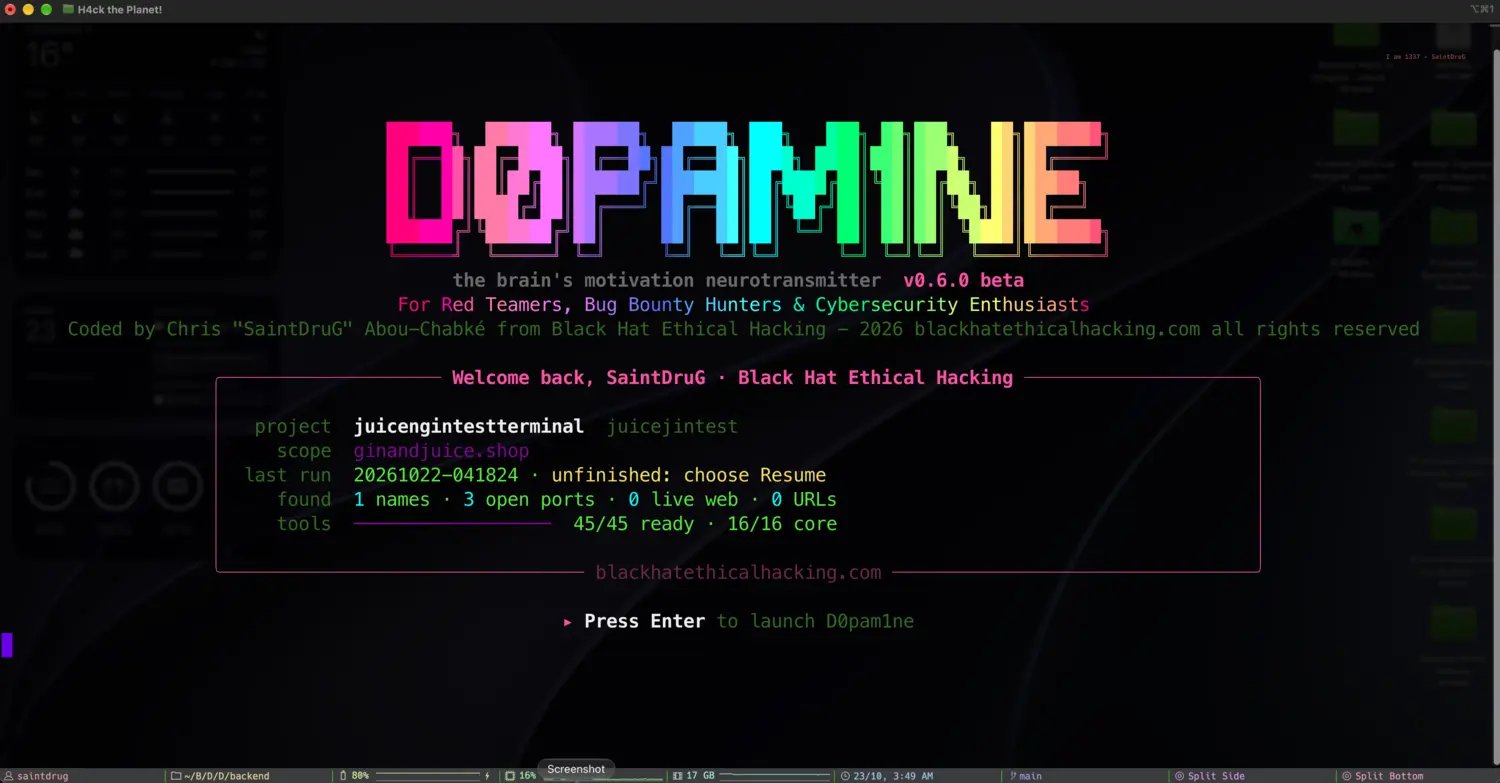
The open-source core: one terminal app that maps a target’s whole attack surface, phase by phase, and hands the work to D0pam1ne Pro.
The D0pam1ne engine is the open-source heart of D0pam1ne: a self-contained
terminal application that takes a target from first scope to a one-page report,
entirely from the command line. It is free, it runs standalone, and it is the
same engine D0pam1ne Pro runs under the hood. Nothing
in Pro bypasses it.
Press Enter to launch: the engine remembers your last project, scope and run
Built for red teamers, bug bounty hunters and cybersecurity practitioners, the
engine fuses a fast, modular recon pipeline, a scope guard that never lets a tool
stray, and an attack toolkit that turns what recon found into ready-to-run
commands. One registry drives all of it, so the toolchain is identical whether
you work from the terminal or from the Pro web app.
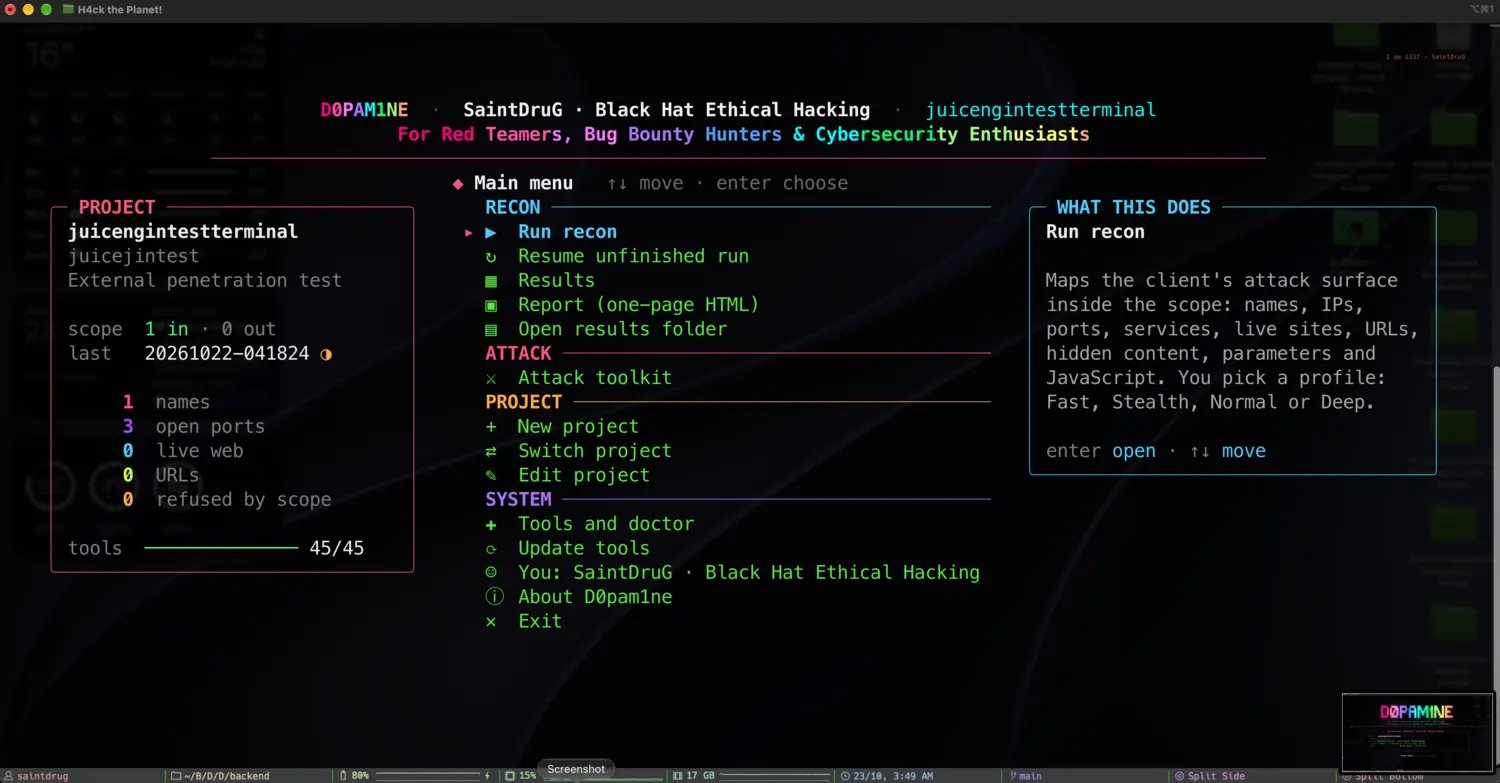
Launch d0pam1ne and you land in the console: your project and scope on the
left, the menu in the middle, and a plain-language explanation of whatever is
selected on the right. Everything is one keystroke away, and nothing runs until
you choose it.
Project and scope, the menu, and what each action does, side by side
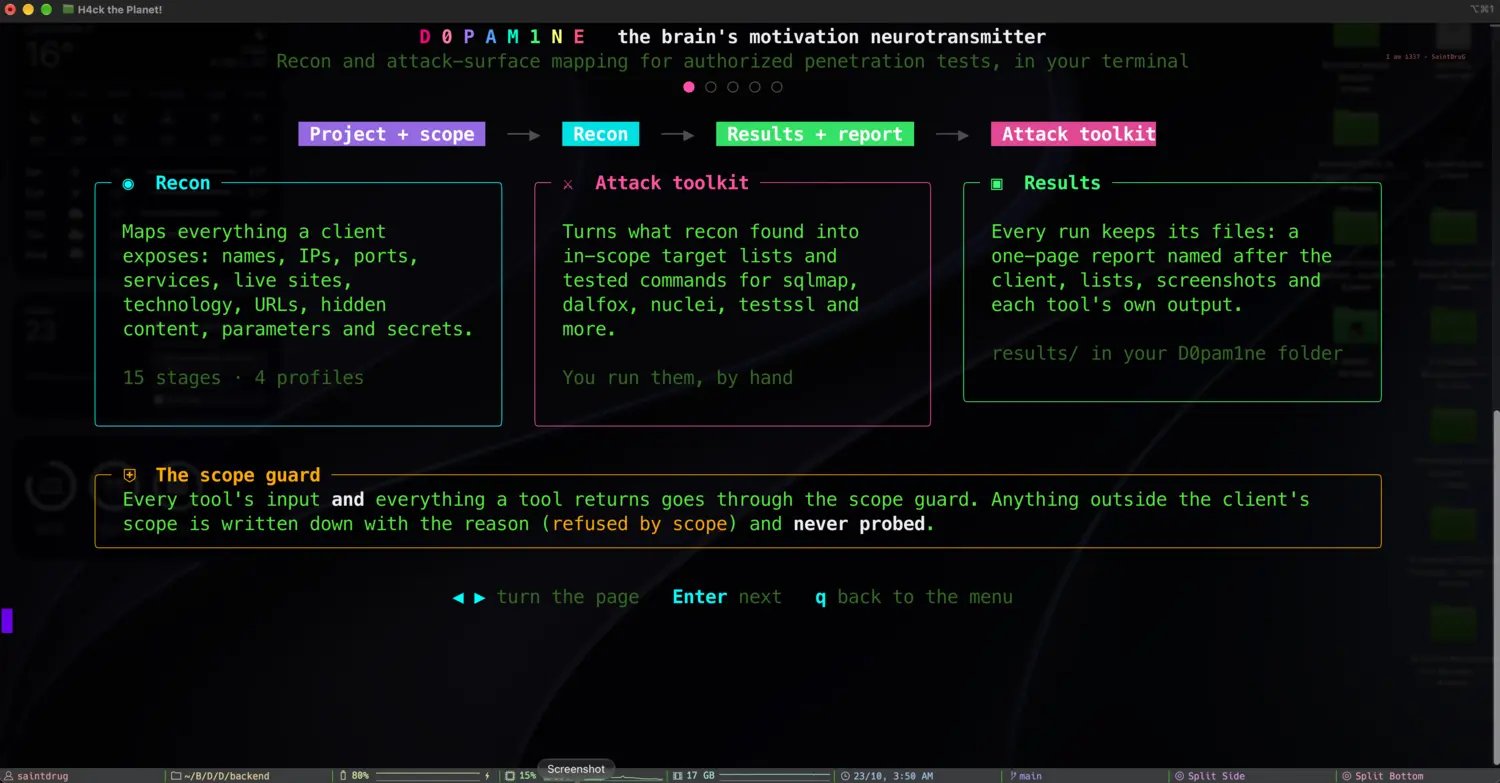
Every engagement is the same shape: a project carries the client and scope, a
profile sets how fast or quiet to go, recon walks an ordered pipeline of
stages, and everything lands in one run folder as lists, JSON and a report.
Project and scope, to recon, to results and report, to the attack toolkit
1
Scope guard
Every target is checked against the project’s in-scope and out-of-scope rules before any tool touches it. Out of scope always wins, and anything refused is written down with the reason, never probed. See Client and scope.
2
Profile
One of fast, stealth, normal or deep sets the pacing, concurrency, wordlist sizes and time limits for the whole run. See Recon profiles.
3
Pipeline
Fifteen ordered stages, from subdomains to JavaScript secrets, each running only the tools that apply and that are installed. See The recon pipeline.
4
Results and report
Each stage writes its files into the run folder. The results browser shows them live, and a one-page HTML report is named after the client. See Results and report.
5
Attack toolkit
When recon is done, the attack toolkit turns the findings into in-scope target lists and tested commands you run by hand. See The attack toolkit.
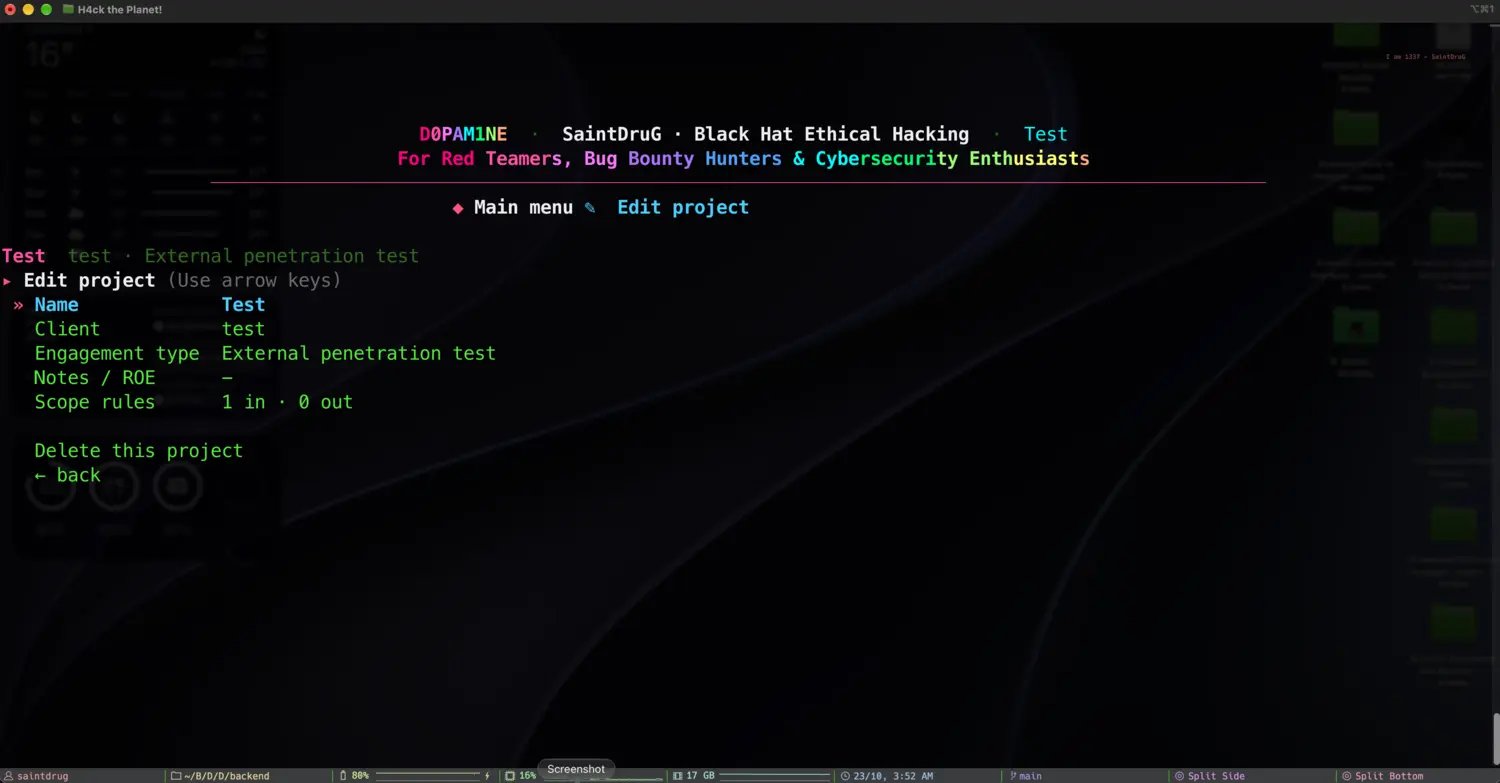
A project is one engagement: a client, a scope, per-tool settings and its recon runs. Create, switch and edit them from the menu or with d0pam1ne project new|list|edit|use|show. The current project is the default target of recon, attack and results.
Editing a project: name, client, engagement type, rules of engagement and scope
Scope
The scope guard supports exact domains, *.wildcards, single IPs, CIDR ranges, and path or port limited web rules. A path-limited host is crawled and probed only within its allowed URLs and is never port scanned. Every tool’s input and output passes through it. Full detail in Client and scope.
Profiles and tool settings
A profile sets the run-wide pacing. Per-project project settings --set tool.key=value overrides individual tool behavior (for example naabu.ports=full, katana.depth=3, gau.enabled=off). The two are merged for each run. See Recon profiles.
The tool registry
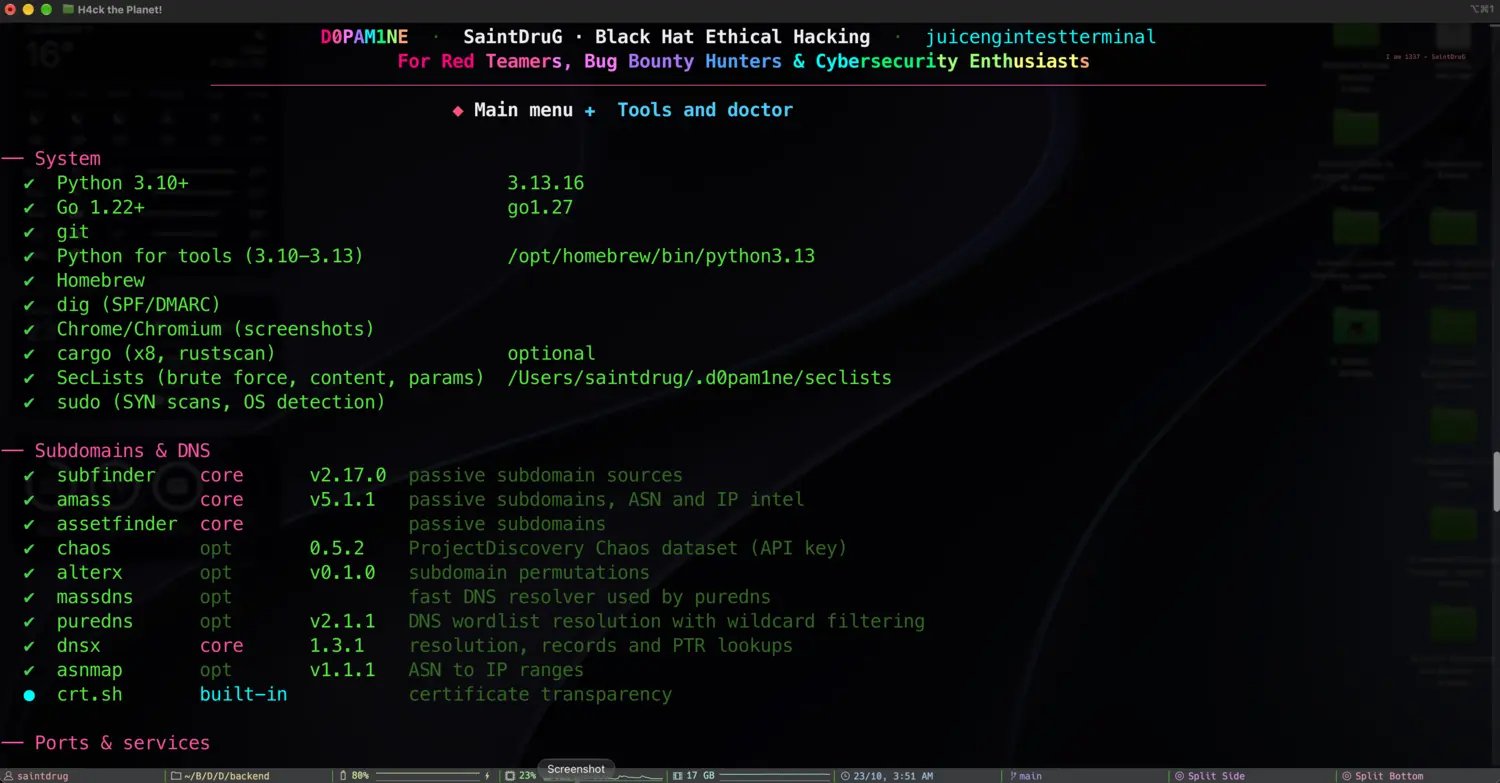
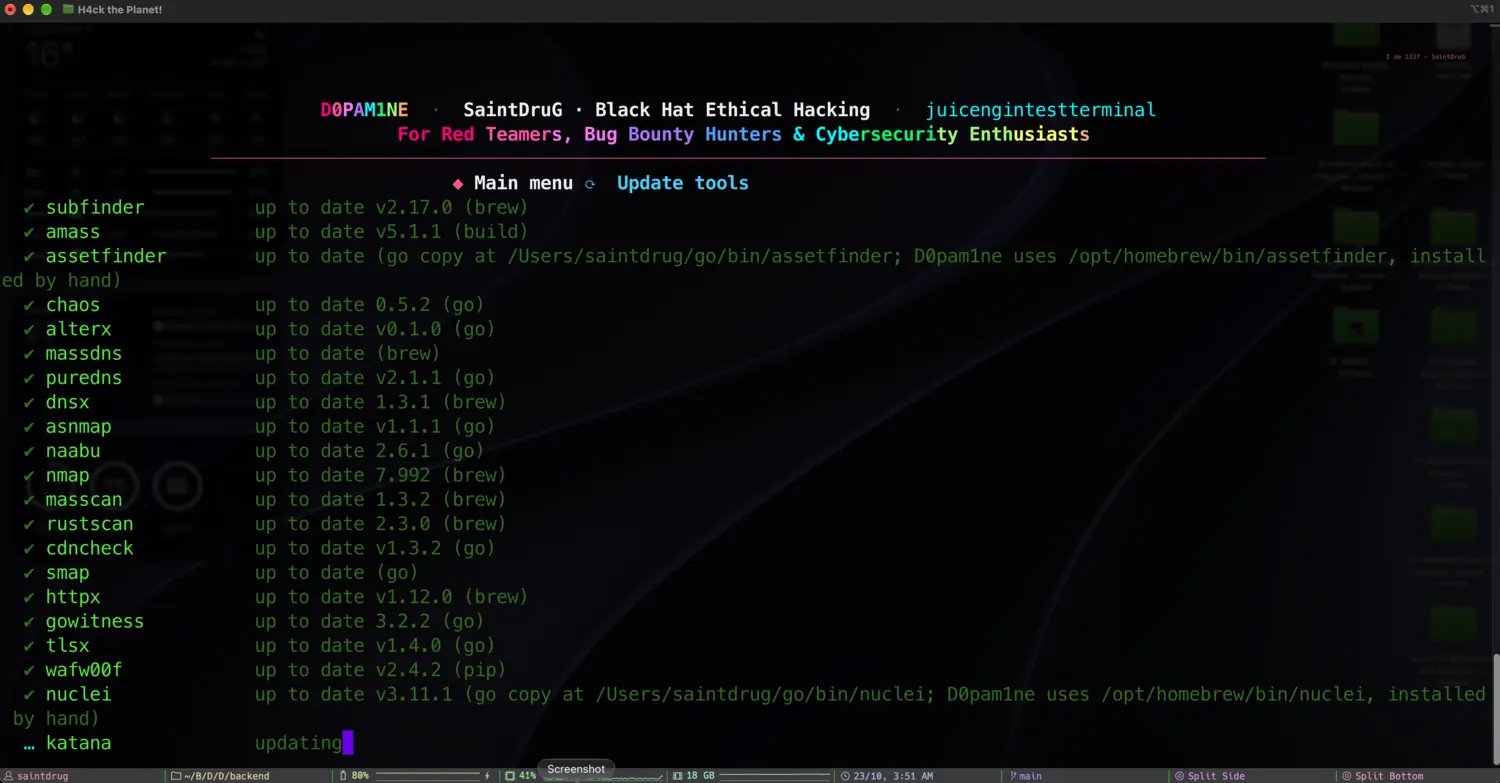
One registry lists every tool, what it does, how to find it and how to install it (Homebrew, apt, go, pip, cargo or git). d0pam1ne doctor checks the system and every tool against the latest release; d0pam1ne tools update brings them current. See the full tool reference.
d0pam1ne doctor: system dependencies and every tool, core, optional or built-in
Updating the toolchain, streamed live as each tool is checked and built
Wordlists
Active discovery uses SecLists. The engine finds an existing copy ($D0P_SECLISTS, /usr/share/seclists, Homebrew) or installs its own, and each profile picks the wordlist size that fits. See Wordlists.
The engine is open source and runs standalone from the terminal. D0pam1ne Pro adds the multi-user web app, attack orchestration, OSINT, triage and local-AI reporting on top of this same core. See Free engine and Pro, and support the project by starring the engine on GitHub.
⌘I
{"docsConfig":{"theme":"maple","$schema":"https://mintlify.com/docs.json","name":"D0pam1ne","description":"Documentation for D0pam1ne, the offensive-security framework by Black Hat Ethical Hacking: one self-hosted workspace for reconnaissance, manual and automated attacks, OSINT, adaptive evasion, a private local AI and client-ready reporting, built by practitioners to take an engagement from scope to signed report.","colors":{"primary":"#4cd964","light":"#5be873","dark":"#0b1115"},"logo":{"light":"https://mintcdn.com/black-hat-ethical-hacking/RPEWzJ10O7hxCV8s/images/logo.gif?fit=max\u0026auto=format\u0026n=RPEWzJ10O7hxCV8s\u0026q=85\u0026s=765fd35101170a8b3bb7b26b14e333a6","dark":"https://mintcdn.com/black-hat-ethical-hacking/RPEWzJ10O7hxCV8s/images/logo.gif?fit=max\u0026auto=format\u0026n=RPEWzJ10O7hxCV8s\u0026q=85\u0026s=765fd35101170a8b3bb7b26b14e333a6"},"favicon":"https://mintcdn.com/black-hat-ethical-hacking/b4GjxNv3NpUdaOxw/favicon.svg?fit=max\u0026auto=format\u0026n=b4GjxNv3NpUdaOxw\u0026q=85\u0026s=542db2f3e9b4d89b8582867dc6ed4134","appearance":{"default":"dark","strict":true},"background":{"color":{"dark":"#06090b"}},"navbar":{"links":[{"href":"https://www.blackhatethicalhacking.com/contact_us","label":"Contact"}],"primary":{"type":"button","label":"blackhatethicalhacking.com","href":"https://www.blackhatethicalhacking.com"}},"footer":{"socials":{"x":"https://twitter.com/secur1ty1samyth","linkedin":"https://www.linkedin.com/build-relation/newsletter-follow?entityUrn=7300505664659877889","youtube":"https://www.youtube.com/channel/UC7-AsunT7zO-ny5-U8glqkw","github":"https://github.com/blackhatethicalhacking","instagram":"https://www.instagram.com/blackhatethicalhacking","facebook":"https://www.facebook.com/secur1ty1samyth","discord":"https://discord.gg/GUcTSc7Fbu"}},"fonts":{"heading":{"family":"Chakra Petch","weight":700},"body":{"family":"IBM Plex Sans"}},"styling":{"latex":false},"navigation":{"global":{"anchors":[{"anchor":"Contact Us","icon":"envelope","href":"https://www.blackhatethicalhacking.com/contact_us"},{"anchor":"BHEH Website","icon":"globe","href":"https://www.blackhatethicalhacking.com"},{"anchor":"Support","icon":"life-ring","href":"https://support.blackhatethicalhacking.com"}]},"pages":[]}},"deployment":{"deploymentMetadataValue":{"subdomain":"black-hat-ethical-hacking","hasAudioNarration":false,"actualSubdomain":"black-hat-ethical-hacking","customDomains":["docs.d0pam1ne.blackhatethicalhacking.com"],"gitSource":{"type":"github","owner":"blackhatethicalhacking","repo":"d0pam1ne-docs","deployBranch":"main","contentDirectory":"","isPrivate":false,"mountPath":"","label":"","_id":"6adaa0337be11ae8c1e54a23"},"chroma":{"latestBuiltDeploymentHistoryId":"6adab0c8aab668ccceb8a745","collectionId":"37f08dff-ca2a-488e-8fd6-bc07755e156e","liveDeploymentHistoryId":"6adab0c8aab668ccceb8a745","schemaVersion":"v3"},"entitlements":{"AI_CHAT":{"status":"ENABLED"},"WEB_MCP":{"status":"ENABLED"},"NARRATION":{"status":"ENABLED"}},"buildId":"6adab2be0b7b511da5d6a73a","clientVersion":"0.0.3939","searchFilterCounts":[{"language":"default","tag":"Documentation","count":55},{"language":"default","tag":"Administration","count":8},{"language":"default","tag":"Project data","count":5},{"language":"default","tag":"Getting started","count":5},{"language":"default","tag":"Reference","count":5},{"language":"default","tag":"Reporting","count":5},{"language":"default","tag":"Attacks","count":4},{"language":"default","tag":"The engine","count":4},{"language":"default","tag":"Core concepts","count":3},{"language":"default","tag":"Evasive Mode","count":3}]},"assistantConfig":{"enableAskAiButton":false,"enableStarterQuestions":false,"enableContextualStarterQuestions":false,"enableAskAiSearchBar":true},"hasChatPermissions":true,"hasWebMcpPermissions":true,"toggles":[{"name":"kill-isr","enabled":true,"variant":{"name":"disabled","enabled":false,"feature_enabled":true},"impressionData":false},{"name":"agent-mintlify-slack","enabled":true,"variant":{"name":"disabled","enabled":false,"feature_enabled":true},"impressionData":false},{"name":"editor-v7-file-tree","enabled":true,"variant":{"name":"disabled","enabled":false,"feature_enabled":true},"impressionData":false},{"name":"agent-integrations-settings","enabled":true,"variant":{"name":"disabled","enabled":false,"feature_enabled":true},"impressionData":false},{"name":"automations-pr-grouping","enabled":true,"variant":{"name":"disabled","enabled":false,"feature_enabled":true},"impressionData":false},{"name":"custom-prefix","enabled":true,"variant":{"name":"disabled","enabled":false,"feature_enabled":true},"impressionData":false},{"name":"analytics-v7","enabled":true,"variant":{"name":"disabled","enabled":false,"feature_enabled":true},"impressionData":false},{"name":"user-flows-analytics","enabled":true,"variant":{"name":"disabled","enabled":false,"feature_enabled":true},"impressionData":false},{"name":"no-publish-flow","enabled":true,"variant":{"name":"disabled","enabled":false,"feature_enabled":true},"impressionData":false},{"name":"workos-onboarding","enabled":true,"variant":{"name":"disabled","enabled":false,"feature_enabled":true},"impressionData":false},{"name":"llms-txt-v2","enabled":true,"variant":{"name":"disabled","enabled":false,"feature_enabled":true},"impressionData":false},{"name":"pause-universal-search-reconcile","enabled":true,"variant":{"name":"disabled","enabled":false,"feature_enabled":true},"impressionData":false},{"name":"snapshot-serving-live","enabled":true,"variant":{"name":"disabled","enabled":false,"feature_enabled":true},"impressionData":false},{"name":"stripTemperatureMiddleware","enabled":true,"variant":{"name":"disabled","enabled":false,"feature_enabled":true},"impressionData":false},{"name":"per-site-search-delta","enabled":true,"variant":{"name":"disabled","enabled":false,"feature_enabled":true},"impressionData":false},{"name":"support-platform-pylon-zendesk","enabled":true,"variant":{"name":"disabled","enabled":false,"feature_enabled":true},"impressionData":false},{"name":"snapshot-serving","enabled":true,"variant":{"name":"disabled","enabled":false,"feature_enabled":true},"impressionData":false},{"name":"instant-rollback","enabled":true,"variant":{"name":"disabled","enabled":false,"feature_enabled":true},"impressionData":false},{"name":"granular-notifications-server","enabled":true,"variant":{"name":"disabled","enabled":false,"feature_enabled":true},"impressionData":false},{"name":"granular-notifications","enabled":true,"variant":{"name":"disabled","enabled":false,"feature_enabled":true},"impressionData":false},{"name":"editor-private-page-search","enabled":true,"variant":{"name":"disabled","enabled":false,"feature_enabled":true},"impressionData":false},{"name":"automations-fable","enabled":true,"variant":{"name":"disabled","enabled":false,"feature_enabled":true},"impressionData":false},{"name":"fixed-ai-action-pricing","enabled":true,"variant":{"name":"disabled","enabled":false,"feature_enabled":true},"impressionData":false},{"name":"automation-resolve-merge-conflict","enabled":true,"variant":{"name":"disabled","enabled":false,"feature_enabled":true},"impressionData":false},{"name":"scoped-publishing","enabled":true,"variant":{"name":"disabled","enabled":false,"feature_enabled":true},"impressionData":false},{"name":"mintql","enabled":true,"variant":{"name":"disabled","enabled":false,"feature_enabled":true},"impressionData":false},{"name":"page-level-analytics","enabled":true,"variant":{"name":"disabled","enabled":false,"feature_enabled":true},"impressionData":false},{"name":"editor-version-history-v2","enabled":true,"variant":{"name":"disabled","enabled":false,"feature_enabled":true},"impressionData":false},{"name":"editor-nav-generations","enabled":true,"variant":{"name":"disabled","enabled":false,"feature_enabled":true},"impressionData":false},{"name":"billing-page-v2","enabled":true,"variant":{"name":"disabled","enabled":false,"feature_enabled":true},"impressionData":false},{"name":"workspace-projects","enabled":true,"variant":{"name":"disabled","enabled":false,"feature_enabled":true},"impressionData":false},{"name":"assistant-v5","enabled":true,"variant":{"name":"disabled","enabled":false,"feature_enabled":true},"impressionData":false},{"name":"byok-sep-25","enabled":true,"variant":{"name":"disabled","enabled":false,"feature_enabled":true},"impressionData":false},{"name":"fork-pr-previews","enabled":true,"variant":{"name":"disabled","enabled":false,"feature_enabled":true},"impressionData":false},{"name":"revalidation-jwt","enabled":true,"variant":{"name":"disabled","enabled":false,"feature_enabled":true},"impressionData":false},{"name":"vite-origin","enabled":true,"variant":{"name":"disabled","enabled":false,"feature_enabled":true},"impressionData":false},{"name":"editor-agent-model-picker","enabled":true,"variant":{"name":"disabled","enabled":false,"feature_enabled":true},"impressionData":false},{"name":"billing-updated-9-15","enabled":true,"variant":{"name":"disabled","enabled":false,"feature_enabled":true},"impressionData":false},{"name":"hobby-abuse-scan","enabled":true,"variant":{"name":"disabled","enabled":false,"feature_enabled":true},"impressionData":false},{"name":"dashboard-inbox","enabled":true,"variant":{"name":"disabled","enabled":false,"feature_enabled":true},"impressionData":false}],"isAtlas":false,"googleFontsInlined":true},"customCss":[{"filePath":"style.css","content":":root{--d0-pink:#ff3d9a;--d0-purple:#c06bff;--d0-cyan:#38e1ff;--d0-green:#4cd964;--d0-amber:#ffb547}.steps [class*=rounded-full],.steps li>div:first-child,ol.steps>li::before{background-image:linear-gradient(135deg,var(--d0-pink),var(--d0-cyan))!important;color:#04120a!important;border:0!important}#sidebar a.active,.sidebar a[data-active=true]{color:var(--d0-green)!important}.callout,[class*=callout]{border-left-width:3px}.card:hover,a[class*=card]:hover{border-color:color-mix(in srgb,var(--d0-green) 50%,transparent)!important}"}],"page":{"pagePath":"engine/overview","slug":"/engine/overview","pageMetadata":{"title":"The D0pam1ne engine","description":"The open-source core: one terminal app that maps a target's whole attack surface, phase by phase, and hands the work to D0pam1ne Pro.","href":"/engine/overview"},"description":{"compiledSource":"\"use strict\";\nconst {jsx: _jsx} = arguments[0];\nconst {useMDXComponents: _provideComponents} = arguments[0];\nfunction _createMdxContent(props) {\n const _components = {\n p: \"p\",\n ..._provideComponents(),\n ...props.components\n };\n return _jsx(_components.p, {\n children: \"The open-source core: one terminal app that maps a target’s whole attack surface, phase by phase, and hands the work to D0pam1ne Pro.\"\n });\n}\nfunction MDXContent(props = {}) {\n const {wrapper: MDXLayout} = {\n ..._provideComponents(),\n ...props.components\n };\n return MDXLayout ? _jsx(MDXLayout, {\n ...props,\n children: _jsx(_createMdxContent, {\n ...props\n })\n }) : _createMdxContent(props);\n}\nreturn {\n default: MDXContent\n};\n","frontmatter":{},"scope":{}},"pageType":"default","mdx":{"mdxSource":{"compiledSource":"\"use strict\";const{Fragment:_Fragment,jsx:_jsx,jsxs:_jsxs}=arguments[0];const{useMDXComponents:_provideComponents}=arguments[0];function _createMdxContent(props){const _components={a:`a`,code:`code`,p:`p`,strong:`strong`,..._provideComponents(),...props.components},{Accordion,AccordionGroup,Card,CardGroup,Frame,Heading,Note,OptimizedImage,Step,Steps}=_components;if(!Accordion)_missingMdxReference(`Accordion`,true);if(!AccordionGroup)_missingMdxReference(`AccordionGroup`,true);if(!Card)_missingMdxReference(`Card`,true);if(!CardGroup)_missingMdxReference(`CardGroup`,true);if(!Frame)_missingMdxReference(`Frame`,true);if(!Heading)_missingMdxReference(`Heading`,true);if(!Note)_missingMdxReference(`Note`,true);if(!OptimizedImage)_missingMdxReference(`OptimizedImage`,true);if(!Step)_missingMdxReference(`Step`,true);if(!Steps)_missingMdxReference(`Steps`,true);return _jsxs(_Fragment,{children:[_jsxs(_components.p,{children:[`The `,_jsx(_components.strong,{children:`D0pam1ne engine`}),` is the open-source heart of D0pam1ne: a self-contained\nterminal application that takes a target from first scope to a one-page report,\nentirely from the command line. It is free, it runs standalone, and it is the\nsame engine `,_jsx(_components.a,{href:`/getting-started/editions`,children:`D0pam1ne Pro`}),` runs under the hood. Nothing\nin Pro bypasses it.`]}),`\n`,_jsx(Frame,{caption:`Press Enter to launch: the engine remembers your last project, scope and run`,children:_jsx(OptimizedImage,{src:`https://mintcdn.com/black-hat-ethical-hacking/GZ18__Wmfy34pdFZ/images/engine/splash.webp?fit=max\u0026auto=format\u0026n=GZ18__Wmfy34pdFZ\u0026q=85\u0026s=261ea58897db3d56bf2fd93238cf401e`,alt:`The D0pam1ne engine welcome screen`,\"data-og-width\":`1500`,width:`1500`,\"data-og-height\":`783`,height:`783`,\"data-path\":`images/engine/splash.webp`,\"data-optimize\":`true`,\"data-opv\":`3`,srcset:`https://mintcdn.com/black-hat-ethical-hacking/GZ18__Wmfy34pdFZ/images/engine/splash.webp?w=280\u0026fit=max\u0026auto=format\u0026n=GZ18__Wmfy34pdFZ\u0026q=85\u0026s=229b636c10a815a40430145c8a71a658 280w, https://mintcdn.com/black-hat-ethical-hacking/GZ18__Wmfy34pdFZ/images/engine/splash.webp?w=560\u0026fit=max\u0026auto=format\u0026n=GZ18__Wmfy34pdFZ\u0026q=85\u0026s=4bbfad7e1bd13ab8e583a1900c4bcdbb 560w, https://mintcdn.com/black-hat-ethical-hacking/GZ18__Wmfy34pdFZ/images/engine/splash.webp?w=840\u0026fit=max\u0026auto=format\u0026n=GZ18__Wmfy34pdFZ\u0026q=85\u0026s=1b4b1057e86ad295cd53040946e7df9e 840w, https://mintcdn.com/black-hat-ethical-hacking/GZ18__Wmfy34pdFZ/images/engine/splash.webp?w=1100\u0026fit=max\u0026auto=format\u0026n=GZ18__Wmfy34pdFZ\u0026q=85\u0026s=5f4c8a24d055de039183bca5a4cdc261 1100w, https://mintcdn.com/black-hat-ethical-hacking/GZ18__Wmfy34pdFZ/images/engine/splash.webp?w=1650\u0026fit=max\u0026auto=format\u0026n=GZ18__Wmfy34pdFZ\u0026q=85\u0026s=619514868a5b0fbdf565a138062f931a 1650w, https://mintcdn.com/black-hat-ethical-hacking/GZ18__Wmfy34pdFZ/images/engine/splash.webp?w=2500\u0026fit=max\u0026auto=format\u0026n=GZ18__Wmfy34pdFZ\u0026q=85\u0026s=adcce4eccb66ecc5370b79a7a52a8d36 2500w`})}),`\n`,_jsx(_components.p,{children:`Built for red teamers, bug bounty hunters and cybersecurity practitioners, the\nengine fuses a fast, modular recon pipeline, a scope guard that never lets a tool\nstray, and an attack toolkit that turns what recon found into ready-to-run\ncommands. One registry drives all of it, so the toolchain is identical whether\nyou work from the terminal or from the Pro web app.`}),`\n`,_jsx(Heading,{level:`2`,id:`the-main-menu`,children:`The main menu`}),`\n`,_jsxs(_components.p,{children:[`Launch `,_jsx(_components.code,{children:`d0pam1ne`}),` and you land in the console: your project and scope on the\nleft, the menu in the middle, and a plain-language explanation of whatever is\nselected on the right. Everything is one keystroke away, and nothing runs until\nyou choose it.`]}),`\n`,_jsx(Frame,{caption:`Project and scope, the menu, and what each action does, side by side`,children:_jsx(OptimizedImage,{src:`https://mintcdn.com/black-hat-ethical-hacking/GZ18__Wmfy34pdFZ/images/engine/main-menu.webp?fit=max\u0026auto=format\u0026n=GZ18__Wmfy34pdFZ\u0026q=85\u0026s=778fe139969cc47099998d87242cdf95`,alt:`The D0pam1ne engine main menu`,\"data-og-width\":`1500`,width:`1500`,\"data-og-height\":`783`,height:`783`,\"data-path\":`images/engine/main-menu.webp`,\"data-optimize\":`true`,\"data-opv\":`3`,srcset:`https://mintcdn.com/black-hat-ethical-hacking/GZ18__Wmfy34pdFZ/images/engine/main-menu.webp?w=280\u0026fit=max\u0026auto=format\u0026n=GZ18__Wmfy34pdFZ\u0026q=85\u0026s=8d78d01ed3c8ecf16855a238eb4dc663 280w, https://mintcdn.com/black-hat-ethical-hacking/GZ18__Wmfy34pdFZ/images/engine/main-menu.webp?w=560\u0026fit=max\u0026auto=format\u0026n=GZ18__Wmfy34pdFZ\u0026q=85\u0026s=1b639cc21b1ae50c17b4be4ca75db7fa 560w, https://mintcdn.com/black-hat-ethical-hacking/GZ18__Wmfy34pdFZ/images/engine/main-menu.webp?w=840\u0026fit=max\u0026auto=format\u0026n=GZ18__Wmfy34pdFZ\u0026q=85\u0026s=fd8ca50a31c784d2242f5ee4b5406a19 840w, https://mintcdn.com/black-hat-ethical-hacking/GZ18__Wmfy34pdFZ/images/engine/main-menu.webp?w=1100\u0026fit=max\u0026auto=format\u0026n=GZ18__Wmfy34pdFZ\u0026q=85\u0026s=1995b6e808f186c11113ebaf5f3912b1 1100w, https://mintcdn.com/black-hat-ethical-hacking/GZ18__Wmfy34pdFZ/images/engine/main-menu.webp?w=1650\u0026fit=max\u0026auto=format\u0026n=GZ18__Wmfy34pdFZ\u0026q=85\u0026s=2ddaf0874610a25af0ce30ac0b993770 1650w, https://mintcdn.com/black-hat-ethical-hacking/GZ18__Wmfy34pdFZ/images/engine/main-menu.webp?w=2500\u0026fit=max\u0026auto=format\u0026n=GZ18__Wmfy34pdFZ\u0026q=85\u0026s=39a2a9ce3a72cb4a56e1939c1358c3ff 2500w`})}),`\n`,_jsx(Heading,{level:`2`,id:`the-shape-of-a-run`,children:`The shape of a run`}),`\n`,_jsxs(_components.p,{children:[`Every engagement is the same shape: a `,_jsx(_components.strong,{children:`project`}),` carries the client and scope, a\n`,_jsx(_components.strong,{children:`profile`}),` sets how fast or quiet to go, recon walks an ordered `,_jsx(_components.strong,{children:`pipeline`}),` of\nstages, and everything lands in one run folder as lists, JSON and a report.`]}),`\n`,_jsx(Frame,{caption:`Project and scope, to recon, to results and report, to the attack toolkit`,children:_jsx(OptimizedImage,{src:`https://mintcdn.com/black-hat-ethical-hacking/GZ18__Wmfy34pdFZ/images/engine/tour-flow.webp?fit=max\u0026auto=format\u0026n=GZ18__Wmfy34pdFZ\u0026q=85\u0026s=e0c6f15acc074f21fe2ba08f5421d1f8`,alt:`The D0pam1ne flow: project and scope, recon, results, attack toolkit`,\"data-og-width\":`1500`,width:`1500`,\"data-og-height\":`783`,height:`783`,\"data-path\":`images/engine/tour-flow.webp`,\"data-optimize\":`true`,\"data-opv\":`3`,srcset:`https://mintcdn.com/black-hat-ethical-hacking/GZ18__Wmfy34pdFZ/images/engine/tour-flow.webp?w=280\u0026fit=max\u0026auto=format\u0026n=GZ18__Wmfy34pdFZ\u0026q=85\u0026s=49203bc5616ea91477a34bb5658725b0 280w, https://mintcdn.com/black-hat-ethical-hacking/GZ18__Wmfy34pdFZ/images/engine/tour-flow.webp?w=560\u0026fit=max\u0026auto=format\u0026n=GZ18__Wmfy34pdFZ\u0026q=85\u0026s=a43118bb25c5cefaefe3a182f556eb0e 560w, https://mintcdn.com/black-hat-ethical-hacking/GZ18__Wmfy34pdFZ/images/engine/tour-flow.webp?w=840\u0026fit=max\u0026auto=format\u0026n=GZ18__Wmfy34pdFZ\u0026q=85\u0026s=110012450c11ed6a75625f872afab3f7 840w, https://mintcdn.com/black-hat-ethical-hacking/GZ18__Wmfy34pdFZ/images/engine/tour-flow.webp?w=1100\u0026fit=max\u0026auto=format\u0026n=GZ18__Wmfy34pdFZ\u0026q=85\u0026s=fb1f1793537d86c3064d989083b65a6d 1100w, https://mintcdn.com/black-hat-ethical-hacking/GZ18__Wmfy34pdFZ/images/engine/tour-flow.webp?w=1650\u0026fit=max\u0026auto=format\u0026n=GZ18__Wmfy34pdFZ\u0026q=85\u0026s=32728c8bae1127e86b4f8ce6abeebfb5 1650w, https://mintcdn.com/black-hat-ethical-hacking/GZ18__Wmfy34pdFZ/images/engine/tour-flow.webp?w=2500\u0026fit=max\u0026auto=format\u0026n=GZ18__Wmfy34pdFZ\u0026q=85\u0026s=3ba959bca0aafa7b08ab4234d147e2ec 2500w`})}),`\n`,_jsxs(Steps,{children:[_jsx(Step,{title:`Scope guard`,children:_jsxs(_components.p,{children:[`Every target is checked against the project’s in-scope and out-of-scope rules before any tool touches it. Out of scope always wins, and anything refused is written down with the reason, never probed. See `,_jsx(_components.a,{href:`/concepts/scope`,children:`Client and scope`}),`.`]})}),_jsx(Step,{title:`Profile`,children:_jsxs(_components.p,{children:[`One of `,_jsx(_components.code,{children:`fast`}),`, `,_jsx(_components.code,{children:`stealth`}),`, `,_jsx(_components.code,{children:`normal`}),` or `,_jsx(_components.code,{children:`deep`}),` sets the pacing, concurrency, wordlist sizes and time limits for the whole run. See `,_jsx(_components.a,{href:`/engine/profiles`,children:`Recon profiles`}),`.`]})}),_jsx(Step,{title:`Pipeline`,children:_jsxs(_components.p,{children:[`Fifteen ordered stages, from subdomains to JavaScript secrets, each running only the tools that apply and that are installed. See `,_jsx(_components.a,{href:`/engine/recon-pipeline`,children:`The recon pipeline`}),`.`]})}),_jsx(Step,{title:`Results and report`,children:_jsxs(_components.p,{children:[`Each stage writes its files into the run folder. The `,_jsx(_components.a,{href:`/engine/results`,children:`results browser`}),` shows them live, and a one-page HTML report is named after the client. See `,_jsx(_components.a,{href:`/engine/results`,children:`Results and report`}),`.`]})}),_jsx(Step,{title:`Attack toolkit`,children:_jsxs(_components.p,{children:[`When recon is done, the `,_jsx(_components.a,{href:`/engine/attack-toolkit`,children:`attack toolkit`}),` turns the findings into in-scope target lists and tested commands you run by hand. See `,_jsx(_components.a,{href:`/engine/attack-toolkit`,children:`The attack toolkit`}),`.`]})})]}),`\n`,_jsx(Heading,{level:`2`,id:`three-ways-to-drive-it`,children:`Three ways to drive it`}),`\n`,_jsxs(CardGroup,{cols:3,children:[_jsx(Card,{title:`Interactive console`,icon:`terminal`,children:_jsxs(_components.p,{children:[`Run `,_jsx(_components.code,{children:`d0pam1ne`}),` with no arguments for the guided, menu-driven session you see above: pick a project, run recon, read results, open the attack toolkit.`]})}),_jsx(Card,{title:`The CLI`,icon:`keyboard`,children:_jsxs(_components.p,{children:[`Scriptable subcommands for every action: `,_jsx(_components.code,{children:`recon`}),`, `,_jsx(_components.code,{children:`attack`}),`, `,_jsx(_components.code,{children:`project`}),`, `,_jsx(_components.code,{children:`tools`}),`, `,_jsx(_components.code,{children:`scope`}),`, `,_jsx(_components.code,{children:`doctor`}),`. Built for automation and CI. See the `,_jsx(_components.a,{href:`/engine/cli-reference`,children:`CLI reference`}),`.`]})}),_jsx(Card,{title:`D0pam1ne Pro`,icon:`browser`,children:_jsx(_components.p,{children:`Pro runs this same engine and streams its live events into a multi-user web app, adding attack orchestration, OSINT, AI triage and client reporting.`})})]}),`\n`,_jsx(Heading,{level:`2`,id:`key-building-blocks`,children:`Key building blocks`}),`\n`,_jsxs(AccordionGroup,{children:[_jsxs(Accordion,{title:`Projects`,icon:`folder`,id:`projects`,children:[_jsxs(_components.p,{children:[`A project is one engagement: a client, a scope, per-tool settings and its recon runs. Create, switch and edit them from the menu or with `,_jsx(_components.code,{children:`d0pam1ne project new|list|edit|use|show`}),`. The current project is the default target of `,_jsx(_components.code,{children:`recon`}),`, `,_jsx(_components.code,{children:`attack`}),` and `,_jsx(_components.code,{children:`results`}),`.`]}),_jsx(Frame,{caption:`Editing a project: name, client, engagement type, rules of engagement and scope`,children:_jsx(OptimizedImage,{src:`https://mintcdn.com/black-hat-ethical-hacking/GZ18__Wmfy34pdFZ/images/engine/edit-project.webp?fit=max\u0026auto=format\u0026n=GZ18__Wmfy34pdFZ\u0026q=85\u0026s=5ed6071818bb4189cadfd77b84f061dc`,alt:`Editing a project in the D0pam1ne engine`,\"data-og-width\":`1500`,width:`1500`,\"data-og-height\":`783`,height:`783`,\"data-path\":`images/engine/edit-project.webp`,\"data-optimize\":`true`,\"data-opv\":`3`,srcset:`https://mintcdn.com/black-hat-ethical-hacking/GZ18__Wmfy34pdFZ/images/engine/edit-project.webp?w=280\u0026fit=max\u0026auto=format\u0026n=GZ18__Wmfy34pdFZ\u0026q=85\u0026s=6fa62a64e81c88f6ffb46bb50b840023 280w, https://mintcdn.com/black-hat-ethical-hacking/GZ18__Wmfy34pdFZ/images/engine/edit-project.webp?w=560\u0026fit=max\u0026auto=format\u0026n=GZ18__Wmfy34pdFZ\u0026q=85\u0026s=71ffac735913ed9ad975f6cd4ec20e48 560w, https://mintcdn.com/black-hat-ethical-hacking/GZ18__Wmfy34pdFZ/images/engine/edit-project.webp?w=840\u0026fit=max\u0026auto=format\u0026n=GZ18__Wmfy34pdFZ\u0026q=85\u0026s=adecdf61b1b8aa1cfc828e643f9f383f 840w, https://mintcdn.com/black-hat-ethical-hacking/GZ18__Wmfy34pdFZ/images/engine/edit-project.webp?w=1100\u0026fit=max\u0026auto=format\u0026n=GZ18__Wmfy34pdFZ\u0026q=85\u0026s=e55354a005d499d1a85677544d1a2f9b 1100w, https://mintcdn.com/black-hat-ethical-hacking/GZ18__Wmfy34pdFZ/images/engine/edit-project.webp?w=1650\u0026fit=max\u0026auto=format\u0026n=GZ18__Wmfy34pdFZ\u0026q=85\u0026s=c3f1fca82c191665f0b50e09ce49aa90 1650w, https://mintcdn.com/black-hat-ethical-hacking/GZ18__Wmfy34pdFZ/images/engine/edit-project.webp?w=2500\u0026fit=max\u0026auto=format\u0026n=GZ18__Wmfy34pdFZ\u0026q=85\u0026s=974dc0056756147890f12a931b5b7a42 2500w`})})]}),_jsx(Accordion,{title:`Scope`,icon:`crosshairs`,id:`scope`,children:_jsxs(_components.p,{children:[`The scope guard supports exact domains, `,_jsx(_components.code,{children:`*.wildcards`}),`, single IPs, CIDR ranges, and path or port limited web rules. A path-limited host is crawled and probed only within its allowed URLs and is never port scanned. Every tool’s input and output passes through it. Full detail in `,_jsx(_components.a,{href:`/concepts/scope`,children:`Client and scope`}),`.`]})}),_jsx(Accordion,{title:`Profiles and tool settings`,icon:`sliders`,id:`profiles-and-tool-settings`,children:_jsxs(_components.p,{children:[`A profile sets the run-wide pacing. Per-project `,_jsx(_components.code,{children:`project settings --set tool.key=value`}),` overrides individual tool behavior (for example `,_jsx(_components.code,{children:`naabu.ports=full`}),`, `,_jsx(_components.code,{children:`katana.depth=3`}),`, `,_jsx(_components.code,{children:`gau.enabled=off`}),`). The two are merged for each run. See `,_jsx(_components.a,{href:`/engine/profiles`,children:`Recon profiles`}),`.`]})}),_jsxs(Accordion,{title:`The tool registry`,icon:`screwdriver-wrench`,id:`the-tool-registry`,children:[_jsxs(_components.p,{children:[`One registry lists every tool, what it does, how to find it and how to install it (Homebrew, apt, go, pip, cargo or git). `,_jsx(_components.code,{children:`d0pam1ne doctor`}),` checks the system and every tool against the latest release; `,_jsx(_components.code,{children:`d0pam1ne tools update`}),` brings them current. See the full `,_jsx(_components.a,{href:`/tools/catalog`,children:`tool reference`}),`.`]}),_jsx(Frame,{caption:`d0pam1ne doctor: system dependencies and every tool, core, optional or built-in`,children:_jsx(OptimizedImage,{src:`https://mintcdn.com/black-hat-ethical-hacking/GZ18__Wmfy34pdFZ/images/engine/doctor.webp?fit=max\u0026auto=format\u0026n=GZ18__Wmfy34pdFZ\u0026q=85\u0026s=9f93d20020bc3d944e8c0ed41f5608fc`,alt:`The d0pam1ne doctor output`,\"data-og-width\":`1500`,width:`1500`,\"data-og-height\":`783`,height:`783`,\"data-path\":`images/engine/doctor.webp`,\"data-optimize\":`true`,\"data-opv\":`3`,srcset:`https://mintcdn.com/black-hat-ethical-hacking/GZ18__Wmfy34pdFZ/images/engine/doctor.webp?w=280\u0026fit=max\u0026auto=format\u0026n=GZ18__Wmfy34pdFZ\u0026q=85\u0026s=015803aef2698bea45c5a61a8a9c225d 280w, https://mintcdn.com/black-hat-ethical-hacking/GZ18__Wmfy34pdFZ/images/engine/doctor.webp?w=560\u0026fit=max\u0026auto=format\u0026n=GZ18__Wmfy34pdFZ\u0026q=85\u0026s=b8f0a63b6de804dfd0fefc42822d8fca 560w, https://mintcdn.com/black-hat-ethical-hacking/GZ18__Wmfy34pdFZ/images/engine/doctor.webp?w=840\u0026fit=max\u0026auto=format\u0026n=GZ18__Wmfy34pdFZ\u0026q=85\u0026s=84f21530fb9b019a677274ef26990398 840w, https://mintcdn.com/black-hat-ethical-hacking/GZ18__Wmfy34pdFZ/images/engine/doctor.webp?w=1100\u0026fit=max\u0026auto=format\u0026n=GZ18__Wmfy34pdFZ\u0026q=85\u0026s=63de538ba0e47b436346aa71f27d24c0 1100w, https://mintcdn.com/black-hat-ethical-hacking/GZ18__Wmfy34pdFZ/images/engine/doctor.webp?w=1650\u0026fit=max\u0026auto=format\u0026n=GZ18__Wmfy34pdFZ\u0026q=85\u0026s=68dc7be3c0f59265cea64834d8b82c05 1650w, https://mintcdn.com/black-hat-ethical-hacking/GZ18__Wmfy34pdFZ/images/engine/doctor.webp?w=2500\u0026fit=max\u0026auto=format\u0026n=GZ18__Wmfy34pdFZ\u0026q=85\u0026s=b6ded2e35e51aa3045a27a16df825d48 2500w`})}),_jsx(Frame,{caption:`Updating the toolchain, streamed live as each tool is checked and built`,children:_jsx(OptimizedImage,{src:`https://mintcdn.com/black-hat-ethical-hacking/GZ18__Wmfy34pdFZ/images/engine/update-tools.webp?fit=max\u0026auto=format\u0026n=GZ18__Wmfy34pdFZ\u0026q=85\u0026s=bbc7dabfba4e6d7c1248bc54ff8e39c3`,alt:`Updating tools in the D0pam1ne engine`,\"data-og-width\":`1500`,width:`1500`,\"data-og-height\":`783`,height:`783`,\"data-path\":`images/engine/update-tools.webp`,\"data-optimize\":`true`,\"data-opv\":`3`,srcset:`https://mintcdn.com/black-hat-ethical-hacking/GZ18__Wmfy34pdFZ/images/engine/update-tools.webp?w=280\u0026fit=max\u0026auto=format\u0026n=GZ18__Wmfy34pdFZ\u0026q=85\u0026s=a48810e32c6eafa8a32d58f84f749520 280w, https://mintcdn.com/black-hat-ethical-hacking/GZ18__Wmfy34pdFZ/images/engine/update-tools.webp?w=560\u0026fit=max\u0026auto=format\u0026n=GZ18__Wmfy34pdFZ\u0026q=85\u0026s=3f0d74492ba2286a0431c1005d60fc0e 560w, https://mintcdn.com/black-hat-ethical-hacking/GZ18__Wmfy34pdFZ/images/engine/update-tools.webp?w=840\u0026fit=max\u0026auto=format\u0026n=GZ18__Wmfy34pdFZ\u0026q=85\u0026s=95ec46a357425e4992b11e83f65fefa3 840w, https://mintcdn.com/black-hat-ethical-hacking/GZ18__Wmfy34pdFZ/images/engine/update-tools.webp?w=1100\u0026fit=max\u0026auto=format\u0026n=GZ18__Wmfy34pdFZ\u0026q=85\u0026s=f85cd22663dc8b031f15ae580a580914 1100w, https://mintcdn.com/black-hat-ethical-hacking/GZ18__Wmfy34pdFZ/images/engine/update-tools.webp?w=1650\u0026fit=max\u0026auto=format\u0026n=GZ18__Wmfy34pdFZ\u0026q=85\u0026s=82205e6f7d64898ab6e81b89dc64a032 1650w, https://mintcdn.com/black-hat-ethical-hacking/GZ18__Wmfy34pdFZ/images/engine/update-tools.webp?w=2500\u0026fit=max\u0026auto=format\u0026n=GZ18__Wmfy34pdFZ\u0026q=85\u0026s=9796dd22f7759727f9bd7b68054bc23d 2500w`})})]}),_jsx(Accordion,{title:`Wordlists`,icon:`list`,id:`wordlists`,children:_jsxs(_components.p,{children:[`Active discovery uses SecLists. The engine finds an existing copy (`,_jsx(_components.code,{children:`$D0P_SECLISTS`}),`, `,_jsx(_components.code,{children:`/usr/share/seclists`}),`, Homebrew) or installs its own, and each profile picks the wordlist size that fits. See `,_jsx(_components.a,{href:`/tools/wordlists`,children:`Wordlists`}),`.`]})})]}),`\n`,_jsxs(Note,{children:[`The engine is open source and runs standalone from the terminal. D0pam1ne Pro adds the multi-user web app, attack orchestration, OSINT, triage and local-AI reporting on top of this same core. See `,_jsx(_components.a,{href:`/getting-started/editions`,children:`Free engine and Pro`}),`, and `,_jsx(_components.a,{href:`/support`,children:`support the project`}),` by starring the engine on GitHub.`]})]})}function MDXContent(props={}){const{wrapper:MDXLayout}={..._provideComponents(),...props.components};return MDXLayout?_jsx(MDXLayout,{...props,children:_jsx(_createMdxContent,{...props})}):_createMdxContent(props)}return{default:MDXContent};function _missingMdxReference(id,component){throw new Error(`Expected `+(component?`component`:`object`)+\" `\"+id+\"` to be defined: you likely forgot to import, pass, or provide it.\")}","frontmatter":{},"scope":{"config":{},"pageMetadata":{"title":"The D0pam1ne engine","description":"The open-source core: one terminal app that maps a target's whole attack surface, phase by phase, and hands the work to D0pam1ne Pro.","href":"/engine/overview"}}},"mdxSourceWithNoJs":null},"mdxExtracts":{"tableOfContents":[{"title":"The main menu","slug":"the-main-menu","depth":2,"children":[]},{"title":"The shape of a run","slug":"the-shape-of-a-run","depth":2,"children":[]},{"title":"Three ways to drive it","slug":"three-ways-to-drive-it","depth":2,"children":[]},{"title":"Key building blocks","slug":"key-building-blocks","depth":2,"children":[]}],"codeExamples":{}},"jsLinks":[],"subdomain":"black-hat-ethical-hacking","siteName":"D0pam1ne","title":"The D0pam1ne engine - D0pam1ne","navMaps":{"firstHrefInVersion":{},"firstHrefInLanguage":{}},"lastModified":"2026-10-23T01:05:07.608Z","originalFileLocation":"engine/overview.mdx"},"headHtml":"\u003cscript data-mint-head>(function(){var d=document.documentElement,p=\"dark\";if(!p){try{p=localStorage.getItem(\"isDarkMode\")}catch(e){}if(p==='true')p='dark';else if(p==='false')p='light';if(p!=='light'\u0026\u0026p!=='dark'\u0026\u0026p!=='system')p=\"dark\"}var r=p==='system'?(matchMedia(\"(prefers-color-scheme: dark)\").matches?'dark':'light'):p;d.classList.remove(r==='dark'?'light':'dark');d.classList.add(r);d.setAttribute(\"data-theme-preference\",p)})();\u003c/script>\u003cmeta data-mint-head name=\"description\" content=\"The open-source core: one terminal app that maps a target\u0026#x27;s whole attack surface, phase by phase, and hands the work to D0pam1ne Pro.\">\u003cmeta data-mint-head name=\"application-name\" content=\"D0pam1ne\">\u003cmeta data-mint-head name=\"generator\" content=\"Mintlify\">\u003clink data-mint-head rel=\"icon\" type=\"image/png\" sizes=\"192x192\" href=\"/mintlify-assets/_mintlify/favicons/black-hat-ethical-hacking/nVuBWv0M9Q5Hq5j9/_generated/favicon/android-chrome-192x192.png\" media=\"(prefers-color-scheme: light)\">\u003clink data-mint-head rel=\"apple-touch-icon\" type=\"image/png\" sizes=\"180x180\" href=\"/mintlify-assets/_mintlify/favicons/black-hat-ethical-hacking/nVuBWv0M9Q5Hq5j9/_generated/favicon/apple-touch-icon.png\">\u003clink data-mint-head rel=\"icon\" type=\"image/png\" sizes=\"16x16\" href=\"/mintlify-assets/_mintlify/favicons/black-hat-ethical-hacking/nVuBWv0M9Q5Hq5j9/_generated/favicon/favicon-16x16.png\" media=\"(prefers-color-scheme: light)\">\u003clink data-mint-head rel=\"icon\" type=\"image/png\" sizes=\"32x32\" href=\"/mintlify-assets/_mintlify/favicons/black-hat-ethical-hacking/nVuBWv0M9Q5Hq5j9/_generated/favicon/favicon-32x32.png\" media=\"(prefers-color-scheme: light)\">\u003clink data-mint-head rel=\"shortcut icon\" type=\"image/x-icon\" href=\"/mintlify-assets/_mintlify/favicons/black-hat-ethical-hacking/nVuBWv0M9Q5Hq5j9/_generated/favicon/favicon.ico\" media=\"(prefers-color-scheme: light)\">\u003clink data-mint-head rel=\"icon\" type=\"image/png\" sizes=\"192x192\" href=\"/mintlify-assets/_mintlify/favicons/black-hat-ethical-hacking/nVuBWv0M9Q5Hq5j9/_generated/favicon-dark/android-chrome-192x192.png\" media=\"(prefers-color-scheme: dark)\">\u003clink data-mint-head rel=\"icon\" type=\"image/png\" sizes=\"16x16\" href=\"/mintlify-assets/_mintlify/favicons/black-hat-ethical-hacking/nVuBWv0M9Q5Hq5j9/_generated/favicon-dark/favicon-16x16.png\" media=\"(prefers-color-scheme: dark)\">\u003clink data-mint-head rel=\"icon\" type=\"image/png\" sizes=\"32x32\" href=\"/mintlify-assets/_mintlify/favicons/black-hat-ethical-hacking/nVuBWv0M9Q5Hq5j9/_generated/favicon-dark/favicon-32x32.png\" media=\"(prefers-color-scheme: dark)\">\u003clink data-mint-head rel=\"shortcut icon\" type=\"image/x-icon\" href=\"/mintlify-assets/_mintlify/favicons/black-hat-ethical-hacking/nVuBWv0M9Q5Hq5j9/_generated/favicon-dark/favicon.ico\" media=\"(prefers-color-scheme: dark)\">\u003cmeta data-mint-head property=\"og:title\" content=\"The D0pam1ne engine - D0pam1ne\">\u003cmeta data-mint-head property=\"og:description\" content=\"The open-source core: one terminal app that maps a target\u0026#x27;s whole attack surface, phase by phase, and hands the work to D0pam1ne Pro.\">\u003cmeta data-mint-head property=\"og:site_name\" content=\"D0pam1ne\">\u003cmeta data-mint-head property=\"og:url\" content=\"https://docs.d0pam1ne.blackhatethicalhacking.com/engine/overview\">\u003cmeta data-mint-head property=\"og:type\" content=\"website\">\u003cmeta data-mint-head property=\"og:image\" content=\"https://black-hat-ethical-hacking.mintlify.app/_mintlify/api/og/v2?division=The+engine\u0026amp;title=The+D0pam1ne+engine\u0026amp;description=The+open-source+core%3A+one+terminal+app+that+maps+a+target%27s+whole+attack+surface%2C+phase+by+phase%2C+and+hands+the+work+to+D0pam1ne+Pro.\u0026amp;theme=21e3e8ff272bc9da57997d19\u0026amp;signature=e03804289671061889cb61b625b67031cf733fb0d06f2f7b1c8b59102787dea3\">\u003cmeta data-mint-head property=\"og:image:width\" content=\"1200\">\u003cmeta data-mint-head property=\"og:image:height\" content=\"630\">\u003cmeta data-mint-head name=\"twitter:card\" content=\"summary_large_image\">\u003cmeta data-mint-head name=\"twitter:title\" content=\"The D0pam1ne engine - D0pam1ne\">\u003cmeta data-mint-head name=\"twitter:description\" content=\"The open-source core: one terminal app that maps a target\u0026#x27;s whole attack surface, phase by phase, and hands the work to D0pam1ne Pro.\">\u003cmeta data-mint-head name=\"twitter:image\" content=\"https://black-hat-ethical-hacking.mintlify.app/_mintlify/api/og/v2?division=The+engine\u0026amp;title=The+D0pam1ne+engine\u0026amp;description=The+open-source+core%3A+one+terminal+app+that+maps+a+target%27s+whole+attack+surface%2C+phase+by+phase%2C+and+hands+the+work+to+D0pam1ne+Pro.\u0026amp;theme=21e3e8ff272bc9da57997d19\u0026amp;signature=e03804289671061889cb61b625b67031cf733fb0d06f2f7b1c8b59102787dea3\">\u003cmeta data-mint-head name=\"twitter:image:width\" content=\"1200\">\u003cmeta data-mint-head name=\"twitter:image:height\" content=\"630\">\u003cmeta data-mint-head name=\"msapplication-config\" content=\"/mintlify-assets/_mintlify/favicons/black-hat-ethical-hacking/nVuBWv0M9Q5Hq5j9/_generated/favicon/browserconfig.xml\">\u003cmeta data-mint-head name=\"apple-mobile-web-app-title\" content=\"D0pam1ne\">\u003cmeta data-mint-head name=\"msapplication-TileColor\" content=\"#4cd964\">\u003clink data-mint-head rel=\"canonical\" href=\"https://docs.d0pam1ne.blackhatethicalhacking.com/engine/overview\">\u003clink data-mint-head rel=\"alternate\" type=\"application/xml\" href=\"/sitemap.xml\">\u003clink data-mint-head rel=\"alternate\" type=\"text/markdown\" href=\"/engine/overview.md\">\u003cscript data-mint-head type=\"application/ld+json\">{\"@context\":\"https://schema.org\",\"@graph\":[{\"@type\":\"Organization\",\"@id\":\"https://docs.d0pam1ne.blackhatethicalhacking.com/#organization\",\"name\":\"D0pam1ne\",\"url\":\"https://docs.d0pam1ne.blackhatethicalhacking.com\",\"logo\":{\"@type\":\"ImageObject\",\"url\":\"https://mintcdn.com/black-hat-ethical-hacking/RPEWzJ10O7hxCV8s/images/logo.gif?fit=max\u0026auto=format\u0026n=RPEWzJ10O7hxCV8s\u0026q=85\u0026s=765fd35101170a8b3bb7b26b14e333a6\"}},{\"@type\":\"WebSite\",\"@id\":\"https://docs.d0pam1ne.blackhatethicalhacking.com#website\",\"name\":\"D0pam1ne\",\"url\":\"https://docs.d0pam1ne.blackhatethicalhacking.com\",\"publisher\":{\"@id\":\"https://docs.d0pam1ne.blackhatethicalhacking.com/#organization\"}},{\"@type\":\"WebPage\",\"@id\":\"https://docs.d0pam1ne.blackhatethicalhacking.com/engine/overview#webpage\",\"url\":\"https://docs.d0pam1ne.blackhatethicalhacking.com/engine/overview\",\"name\":\"The D0pam1ne engine\",\"description\":\"The open-source core: one terminal app that maps a target's whole attack surface, phase by phase, and hands the work to D0pam1ne Pro.\",\"dateModified\":\"2026-10-23T01:05:07.608Z\",\"isPartOf\":{\"@id\":\"https://docs.d0pam1ne.blackhatethicalhacking.com#website\"},\"breadcrumb\":{\"@id\":\"https://docs.d0pam1ne.blackhatethicalhacking.com/engine/overview#breadcrumb\"}},{\"@type\":\"BreadcrumbList\",\"@id\":\"https://docs.d0pam1ne.blackhatethicalhacking.com/engine/overview#breadcrumb\",\"itemListElement\":[{\"@type\":\"ListItem\",\"position\":1,\"name\":\"D0pam1ne\",\"item\":\"https://docs.d0pam1ne.blackhatethicalhacking.com\"},{\"@type\":\"ListItem\",\"position\":2,\"name\":\"The D0pam1ne engine\",\"item\":\"https://docs.d0pam1ne.blackhatethicalhacking.com/engine/overview\"}]},{\"@type\":[\"Article\",\"TechArticle\"],\"@id\":\"https://docs.d0pam1ne.blackhatethicalhacking.com/engine/overview#article\",\"headline\":\"The D0pam1ne engine\",\"name\":\"The D0pam1ne engine\",\"description\":\"The open-source core: one terminal app that maps a target's whole attack surface, phase by phase, and hands the work to D0pam1ne Pro.\",\"url\":\"https://docs.d0pam1ne.blackhatethicalhacking.com/engine/overview\",\"mainEntityOfPage\":{\"@id\":\"https://docs.d0pam1ne.blackhatethicalhacking.com/engine/overview#webpage\"},\"dateModified\":\"2026-10-23T01:05:07.608Z\",\"publisher\":{\"@id\":\"https://docs.d0pam1ne.blackhatethicalhacking.com/#organization\"},\"isPartOf\":{\"@id\":\"https://docs.d0pam1ne.blackhatethicalhacking.com#website\"}}]}\u003c/script>\u003cscript data-mint-head type=\"application/ld+json\">{\"@context\":\"https://schema.org\",\"@type\":\"WebSite\",\"name\":\"D0pam1ne\",\"creator\":{\"@type\":\"Organization\",\"name\":\"Mintlify\",\"url\":\"https://mintlify.com\"}}\u003c/script>","siteName":"D0pam1ne","nav":{"global":{"anchors":[{"anchor":"Contact Us","icon":"envelope","href":"https://www.blackhatethicalhacking.com/contact_us"},{"anchor":"BHEH Website","icon":"globe","href":"https://www.blackhatethicalhacking.com"},{"anchor":"Support","icon":"life-ring","href":"https://support.blackhatethicalhacking.com"}]},"tabs":[{"tab":"Documentation","groups":[{"group":"Getting started","pages":[{"title":"D0pam1ne Overview","href":"/introduction"},{"title":"Free engine and Pro","href":"/getting-started/editions"},{"title":"Installation","href":"/getting-started/installation"},{"title":"First login","href":"/getting-started/first-login"},{"title":"The in-app Guide","href":"/getting-started/the-guide"}]},{"group":"Core concepts","pages":[{"title":"The Command Center","href":"/concepts/command-center"},{"title":"Projects","href":"/concepts/projects"},{"title":"Client and scope","description":"Set what is in scope with domains, wildcards, IPs, ranges and path-limited web rules. Out of scope always wins.","href":"/concepts/scope"}]},{"group":"The engine","pages":[{"title":"The D0pam1ne engine","href":"/engine/overview"},{"title":"Running a recon","description":"From the authorization briefing to the live run screen to the per-stage summary: what a recon looks like as it happens.","href":"/engine/running-recon"},{"title":"The recon pipeline","href":"/engine/recon-pipeline"},{"title":"Recon profiles","href":"/engine/profiles"},{"title":"Results and report","href":"/engine/results"},{"title":"The attack toolkit","href":"/engine/attack-toolkit"},{"title":"CLI reference","href":"/engine/cli-reference"}]},{"group":"Recon","pages":[{"title":"Recon overview","href":"/recon/overview"},{"title":"Running recon","href":"/recon/running-recon"}]},{"group":"Evasive Mode","pages":[{"title":"Evasive Mode","href":"/evasion/overview"},{"title":"Adaptive pacing","href":"/evasion/pacing"},{"title":"Tor egress and exit rotation","href":"/evasion/tor"}]},{"group":"Project data","pages":[{"title":"Hosts and services","href":"/data/hosts-and-services"},{"title":"Attack surface graph","href":"/data/attack-surface"},{"title":"Traffic log","href":"/data/traffic"},{"title":"Issues and Needs Review","href":"/data/issues"},{"title":"Out of scope","href":"/data/out-of-scope"}]},{"group":"Attacks","pages":[{"title":"Manual Attacks","href":"/attacks/manual-attacks"},{"title":"Automated Attacks","href":"/attacks/automated-attacks"},{"title":"Attack categories","href":"/attacks/categories"},{"title":"The Attack Equalizer","href":"/attacks/attack-equalizer"}]},{"group":"OSINT","pages":[{"title":"OSINT","href":"/osint/overview"}]},{"group":"Importing","pages":[{"title":"Importing scans","href":"/import/import-scans"}]},{"group":"Reporting","pages":[{"title":"Report Builder","href":"/reporting/report-builder"},{"title":"Interactive report","href":"/reporting/interactive-report"},{"title":"PDF report and finding anatomy","href":"/reporting/pdf-report"},{"title":"Word export","href":"/reporting/word-export"},{"title":"Retest reports","href":"/reporting/retest"}]},{"group":"AI","pages":[{"title":"Local AI","href":"/ai/local-ai"},{"title":"AI memory and house style","href":"/ai/ai-memory"}]},{"group":"Vulnerability intel","pages":[{"title":"Vulnerability intelligence","href":"/vuln-intel/overview"}]},{"group":"Tools","pages":[{"title":"Tools","href":"/tools/overview"},{"title":"Tool reference","href":"/tools/catalog"},{"title":"Wordlists","href":"/tools/wordlists"}]},{"group":"Administration","pages":[{"title":"Team","href":"/admin/team"},{"title":"Settings and company identity","href":"/admin/settings"},{"title":"API keys","href":"/admin/api-keys"},{"title":"Audit log","href":"/admin/audit-log"},{"title":"Time tracker","href":"/admin/time-tracker"},{"title":"Backups","href":"/admin/backups"},{"title":"Resources","href":"/admin/resources"},{"title":"Updates","href":"/admin/updates"}]},{"group":"Reference","pages":[{"title":"Configuration","href":"/reference/configuration"},{"title":"API reference","href":"/reference/api"},{"title":"Cheat sheet","href":"/reference/cheat-sheet"},{"title":"Security and safe use","href":"/reference/security"},{"title":"FAQ","href":"/reference/faq"}]},{"group":"Extras","pages":[{"title":"Playt1me","href":"/extras/playtime"},{"title":"Help and support","href":"/extras/help-and-support"},{"title":"Support the project","href":"/support"}]}]}]},"title":"The D0pam1ne engine - D0pam1ne","buildId":"dpl_5UDDZ9hnigTkoV7QtvQ39eUp84nu","deploymentId":"dpl_5UDDZ9hnigTkoV7QtvQ39eUp84nu","dynamics":["07c022d89b","a74be98ba7"],"chunks":["Frame-CUTvSGqu.js","DynamicMarkdown-BGu84FgU.js","zoom-image-lightbox-ChyC7Hte.js","PlusIcon-DXkY3IBj.js","lightbox-handle-r17bVUz3.js"]}